Request Anything By Commenting On Request Zone And Dont Forget to Skip The Add For Download

Softwares: Downloaders
Showing posts with label Downloaders. Show all posts

Wednesday, 20 February 2013

Internet Download Manager

Posted by Unknown On 10:29 No comments

New! Internet Download Manager v6.15. Added Windows 8 compatibility. Fixed compatibility problems with different browsers including Internet Explorer 10, all Mozilla Firefox versions up to Mozilla Firefox Aurora, Google Chrome. Improved FLV grabber to save videos from web players on YouTube, WOW! Google Video, MySpace TV, and other popular sites

Internet Download Manager (IDM) is a tool to increase download speeds by up to 5 times, resume and schedule downloads. Comprehensive error recovery and resume capability will restart broken or interrupted downloads due to lost connections, network problems, computer shutdowns, or unexpected power outages. Simple graphic user interface makes IDM user friendly and easy to use.Internet Download Manager has a smart download logic accelerator that features intelligent dynamic file segmentation and safe multipart downloading technology to accelerate your downloads. Unlike other download managers and accelerators Internet Download Manager segments downloaded files dynamically during download process and reuses available connections without additional connect and login stages to achieve best acceleration performance.
Internet Download Manager supports proxy servers, ftp and http protocols, firewalls, redirects, cookies, authorization, MP3 audio and MPEG video content processing. IDM integrates seamlessly into Microsoft Internet Explorer, Netscape, MSN Explorer, AOL, Opera, Mozilla, Mozilla Firefox, Mozilla Firebird, Avant Browser, MyIE2, and all other popular browsers to automatically handle your downloads. You can also drag and drop files, or use Internet Download Manager from command line. Internet Download Manager can dial your modem at the set time, download the files you want, then hang up or even shut down your computer when it's done.

Other features include multilingual support, zip preview, download categories, scheduler pro, sounds on different events, HTTPS support, queue processor, html help and tutorial, enhanced virus protection on download completion, progressive downloading with quotas (useful for connections that use some kind of fair access policy or FAP like Direcway, Direct PC, Hughes, etc.), built-in download accelerator, and many others.
Version 6.15 adds Windows 8 compatibility, adds IDM download panel for web-players that can be used to download flash videos from sites like YouTube, MySpaceTV, and Google Videos. It also features complete Windows 7 and Vista support, YouTube grabber, redeveloped scheduler, and MMS protocol support. The new version also adds improved integration for IE 10 and IE based browsers, redesigned and enhanced download engine, the unique advanced integration into all latest browsers, improved toolbar, and a wealth of other improvements and new features.


CNet
Top Rated.

ZDNet
Editors pick.

Cnet Rating
Most Popular.

volftp.mondadori.com
Awards 2003.

Download.com
Editors pick.

WebAttack.com
5/5 rating. Editors pick.

softpedia.com
5/5 rating.
Soft pedia pick

SofoTex.com
5/5 rating.

BrotherSoft.com
5/5 rating. Editors pick.

Download.com
5/5 rating.

GlobalShareware.com
5/5 rating.

Bluechillies.com
5/5 rating.

The file transit
5/5 rating.

TopShareware.com
5/5 rating.

5star-Shareware.com
5/5 rating.

soft32.com
5/5 rating.

Softpile.com
5/5 rating
.

Internet Download Accelerator

Posted by Unknown On 10:16 No comments
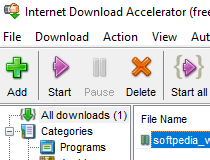
Internet Download Accelerator, often called IDA, is a download manager for Microsoft Windows, created by a Ukrainian software company, WestByte Software. The program's common name in the CIS region is Download Master


Features

IDA integrates with Yandex.Browser, Internet Explorer, Firefox, Opera, Google Chrome, Apple Safari[3] and all web browsers that are built based on these, such as Maxthon. Once these browsers started a download, IDA takes over. It can also take over the download of streaming video from websites like Youtube. Alternatively, it can accept a list of URLs from the clipboard or through drag and drop.
IDA can adjust the maximum speed of download, either manually or automatically. IDA can also browse FTP servers or preview the contents of ZIP or RAR files before downloading them.

Uget Download Manager

Posted by Unknown On 10:16 No comments
Features
uGet is a VERY Powerful download manager application with a large inventory of features but is still very light-weight and low on resources, so don't let the impressive list of features scare you into thinking that it "might be too powerful" because remember power is good and lightweight power is uGet!

General App Features:

Downloads Queue: place your downloads into a Queue to download as many, or as few, downloads as you want simultaneously. As a download finishes the queue will automatically start downloading the remaining files.
 
Resume Downloads: if your connection drops out you don't have to worry, you can start right back where you were with download resuming. (not guaranteed, server controlled and can not be bypassed by a download manager)
 
Advanced Download Categories: unlimited categories to manage your downloads...scroll down for Category specific features.
 
Clipboard Monitor: specify the types of files (via extension) that you want to monitor and any time you add them to your clipboard it will prompt to download the copied files. (universal browser integration) - also works with batch downloads.
 
Batch Downloads: allows the user to add an unlimited amount of files at one time to the queue for downloading...scroll down for Batch specific features.
 
Multi-Protocol: support for downloading files through HTTP, HTTPS, FTP, BitTorrent* & Metalink*
 
Multi-Connection* (aka Multi-Segment): up to 20 simultaneous connections PER download - uGet's Multi-Connection feature also utilizes adaptive segment management which means that when one segment drops out then the other connections pick up the slack to ensure optimal download speeds at all times. This also applies to segments that become drastically slow due to server limitations.
 
FTP Login & Anonymous FTP: supports downloading from anonymous FTP as well as login support via Username & Password for private/protected FTP servers.
 
Scheduler: scheduling of when uGet is allowed or not allowed to download files.
 
FireFox Integration via FlashGot: Clipboard Monitor is all you need for browser integration really but FlashGot is a separately supported FireFox addon so we have made it compatible with uGet.
 
Quiet Mode: allows downloads to be added to a specific category automatically and begin downloading automatically, skipping the dialog properties popup.
 
Robust Keyboard Shortcuts: lots of keyboard shortcuts like the typical Ctrl + N (New), Ctrl + Q (Exit App) but also select a download and press Delete to remove the entry from Download History or Shift + Delete to remove the entry and to delete the downloaded file. Other download specific shortcuts include Return & Shift + Return to open a download via default application & to open the containing folder of a download respectively.
 
Computer Shutdown After Completion: optional feature to turn off your computer after all files have finished downloading, perfect for large download sessions that will take overnight while you sleep.
 
CLI / Terminal Usage Support: ability to use a command line or terminal to download files.
 
Folder Auto-Creation: if you provide a path to save a file but the folder doesn't exist uGet will create it for you automatically in order to save the file there.
 
Download History Management: keep a history of downloads for finished entries and recycled entries up to 9,999 files per list, or automatically delete the oldest entries once your custom limit has been met.
 
Multi-Language Support: uGet uses English by default but also supports 12 other languages including: Belarusian, Chinese (Simplified), Chinese (Traditional), Czech English, French, German, Hungarian, Italian, Polish, Russian, Spanish, Turkish, Ukrainian
 
Aria2 Plugin: Aria2 & uGet integrate to provide a nice user-friendly GUI for the Aria2 CLI app. (^ *requires aria2 plugin)

Orbit Downloader

Posted by Unknown On 10:11 No comments

MultiGet

Posted by Unknown On 09:45 No comments
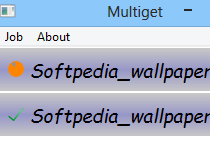
MultiGet is an easy-to-use and open source file Download Manager for Windows
/ Linux / Mac OS X / BSDs like flashget or getright. It supports HTTP/FTP
protocols which covers the requirements of most users.

The Download Accelerator will support multi-tasking with multi-thread on
multiple servers.

Multiget supports resuming downloads if the Web server supports it, and if you
like, you can reconfigure the thread number without stopping the current
task. It also supports SOCKS 4,4a,5 proxy, ftp proxy, http proxy.

We introduced a new feature, that is so called P2SP, or in other words, get
file from multiple servers, and combine the data from different sites into
one file! This makes downloads complete much faster than all the most other
download tools.

MultiGet also supports switching language dynamically, you can choose
English, Chinse, German. Plus this free Downloader will automatic choose a
proper language for you.

Gigaget Download Manager

Posted by Unknown On 09:35 No comments

Gigaget Download Manager

Note: Our official website might be extremely slow to overseas users, thus we use this page to display essential information about Gigaget Download Manager.
Gigaget is the Ultimate Download Manager Designed for Next Generation.

Contact Gigaget Product Manager by gigaget@mail.com

Gigaget is the next generation download manager which utilizes cutting-edge Net Grid technology that improves your download speed by 7-10 times.
Besides, Gigaget fundamentally reduces the operational cost of content providers, while dramatically improving downloading effectiveness and reach. Net Grid Technology taps the unused resources of networked PCs and servers, allowing content providers to deliver large files with faster speed and at a fraction of the cost of traditional solutions.

It features:

Free and safe
• 100% free
• No adware or spyware
• No registration required
• Data transfer encrypted
Easy to use and manage
• Simple and advance mode, fit for both rookies and advanced users.
• Powerful Task Manager, easy to organize downloaded files
More than fast
• Ultra-fast download speed experience
• Auto data integrity validation and correction
• Import/export download list, easy to share with friends
Multi file formats and browsers Support• Compatible with major browsers-Internet Explorer, Mozilla/Firefox, Maxthon
• Major streaming protocol support, including MMS/RTSP/Flash
• Intelligent Web Analysis, helping you find the URL (out of a web page) to download
Advanced Intelligent Functions
• Intelligent Disk Cache system which protects your hard disk from high-speed download
• Intelligent Prompt System, providing useful information and suggestions for each specific situation
• Unique Error Diagnosis function, helping users find the reasons and solutions on failed tasks

GetGo Download Manager

Posted by Unknown On 09:32 No comments

FlashGet Download Manager

Posted by Unknown On 09:26 No comments


New Feature for V3.3
FlashGet3.3 supports HTTP,FTP,BT and eMule protocols.
The new P4S technique chould highly accelerate the downloading process.
IE6,IE7,IE8 and Firefox are supported.
For more features,download now!


Recommended Download Sites
Update for V1.9.6
Add "FlashGet Recommends"
Optimized the BT module
Fixed the messy code in "new download" window
Other improvements